
In this post and video, we are going to see how to get an enum value label from a table field to bind it to the model in the model mapping.
Requirement:
We need to export the label enum value of the field DocumentState from PurchTable table.
How to:
First of all, once we are in the model mapping, we need to create a data source of type Enumeration under the Dynamics 365 for Operations (don’t get confused by the one under the Data Model node):
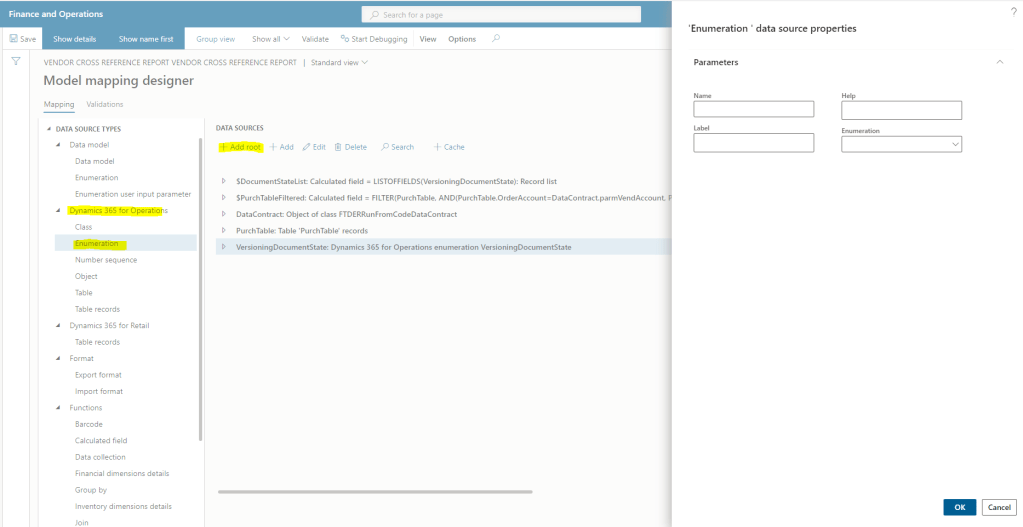
Let’s call it the same name as the base enum “VersioningDocumentState”. A new object with all the different enum values will be created:

ListOfFields
This added base enum will be useful for us, because we can use the function LISTOFFIELDS to create a calculated field based in it. The calculated field will be a record list with the different elements as rows, and we create it as follows:
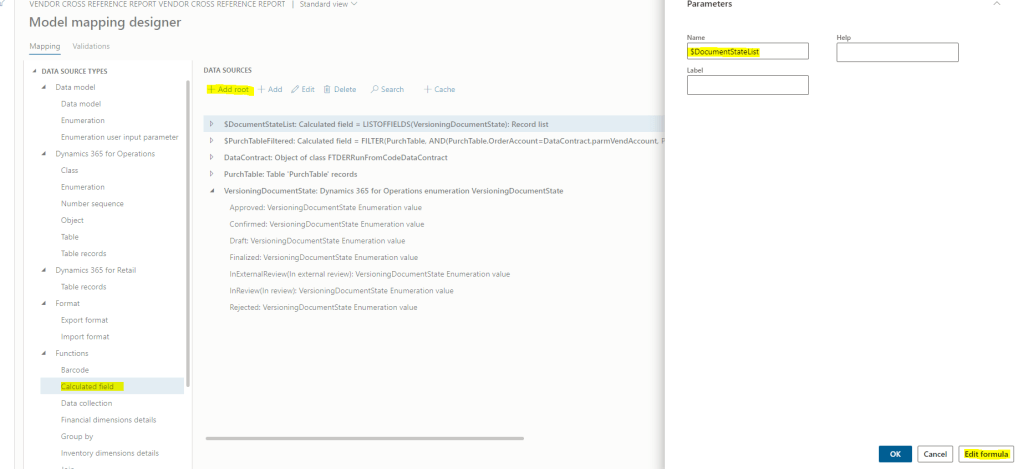
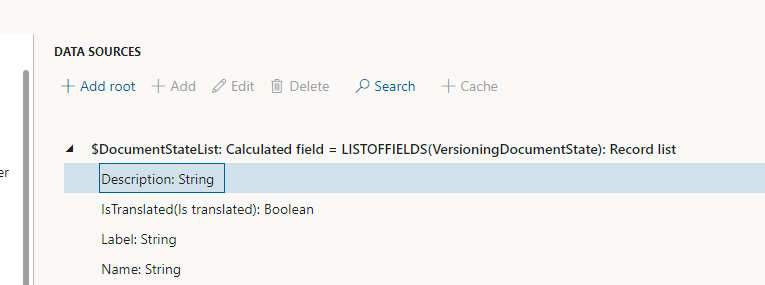
We go to edit formula and we type the next expression LISTOFFIELDS(VersioningDocumentState). The result:
The function LISTOFFIELDS also accepts as a second parameter the language, make sure you send the report language in case you are having any issues with translations.
But as we see there, we don’t have any field for the enum element value itself, for which we could filter using the table field value… so we need to create it.
GetEnumValueByName
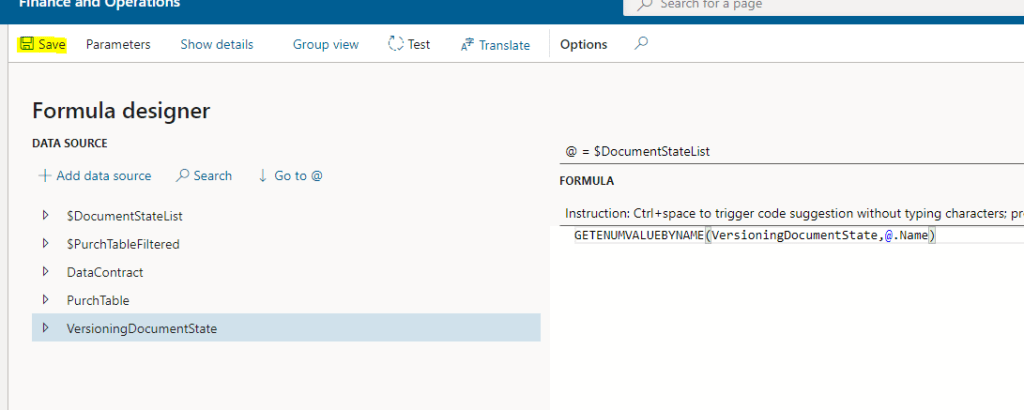
We’ll need to create a nested CalculatedField under the $DocumentStateList, as follows:

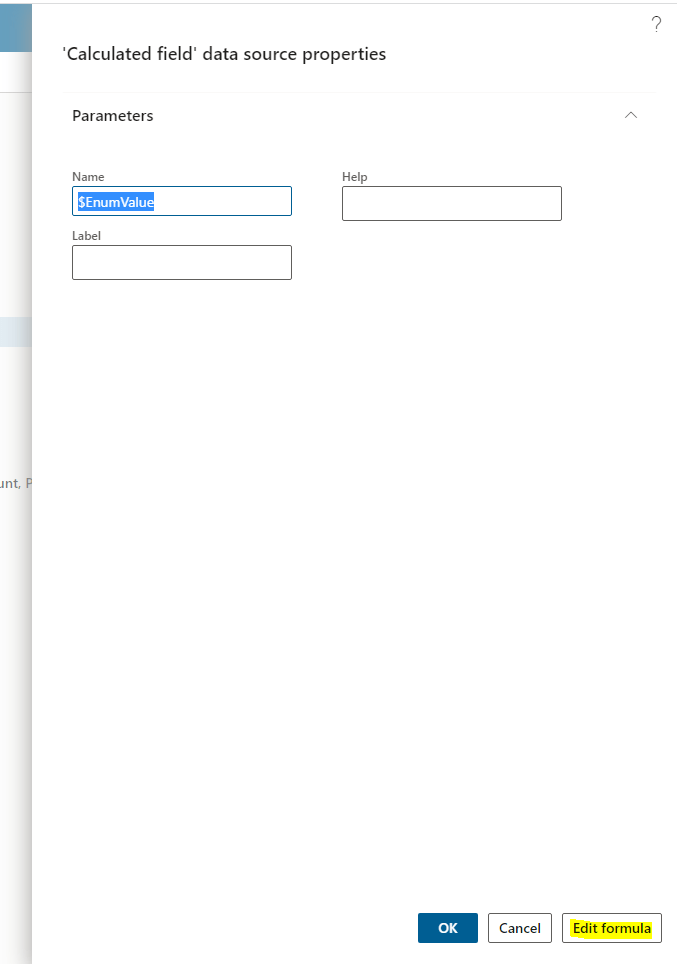
We set the formula to GETENUMVALUEBYNAME(VersioningDocumentState,@.Name)
Bind it to the model string node
Now that we have a list with the different enum elements, including the value, we can bind it to the model string node using the where function to filter the value in the table.
Click on the node to bind with in the Data Model part, Edit:

And the formula will look like:
FIRSTORNULL(WHERE(‘$DocumentStateList’, ‘$DocumentStateList’.’$EnumValue’ = @.DocumentState)).Label
where the WHERE function is filtering the $DocumentStateList using the $EnumValue calculated field by the actual table field value. Afterwards, we need to use the FIRSTORNULL function before accessing the Label property, since the Where returns a list and we couldn’t access the properties directly of a list, so, as we know we are filtering by a non duplicates field, we can use the FIRSTORNULL function to get the record filtered without fear, and so access the LABEL that is going to be bound.
In conclusion
Something very common and simple like binding Enum fields is a little more complex than what we might think initially, this is the way I found to deal with them and once you know it, it’s pretty straightforward. If you know better solutions for it, please let me know!
 Fernitudela.dev
Hi Fernando!
Thanks a lot for your blogs,
I saw the last one on user input and this one on enums and I’ve been kind of stuck with the following scenario.
I am creating an ER report that requires input from the user – specifically requires that the user selects a value from a drop down list (enum value).
So, previous to generate the report will ask the user for this value and then the idea is that this value is printed on the report. But, I have not been able to map that value against the format, as if I try to use the function LISTOFFIELDS or GETENUMVALUE and select this user input parameter, I get the following error: Validation error: The parameter of LISTOFFIELDS function must be a valid path to a datasource of ‘record’ or ‘record list’ data type.
Do you have any advice?
Thanks in advance!
LikeLike
Sorry, I would need to see the exact scenario to spot what is wrong in your case, It could be many things
LikeLike
To follow your example… imagine the user will be the one to select the document status (i.e. rejected, approved, etc) and based on this selection you’ll filter the transactions to be shown in the report
LikeLike
Then you create a User Input Parameter, and in the EDT/Enum field you select your D365FO Enum. Later you can use that value directly to filter for fields based on that enum, or if you want to show it in the format, then follow the steps of this post. I hope it is clear! 🙂
LikeLike
To follow your example… imagine the user would have to select the document status to generate the report / to filter the transactions, they’ll select from the drop down list if they want to see the rejected transations or approved, etc.
LikeLike
Thanks Fernando!! I was able to it following your video! Thanks a lot!
LikeLike