
In this post and video we are going to see how you can easily execute an Electronic Reporting format from code and pass to the ER either the user input parameters or a data contract fulfilled. If you have no idea of how to use/configure the ER, it’s a good time to see the ER from scratch series: Electronic Reporting from Scratch Part 1.
Using User Input Parameters (not recommended)
The User Input Parameters need to be added in the model mapping of your ER. Go to your model -> designer -> map model to datasource (create one if you don’t have one, or select the right one)-> Designer.

Once you have the Input user parameter that you want to fill in your code (and that you are going to use normally to filter the data of your ER), you should save the path of it, in this case as it’s in root level, It would be directly HeaderId. You are going to need this and the name of your model node in the format. To get it, go to your format -> Designer, and in the mapping tab you should see your model root, in our case it’s named model.

Now we have everything we need to call our ER by code. We are going to do it like that:
    public static void runER()
    {
        const str erHeaderIdParam = 'model/HeaderId';

        ERModelDefinitionInputParametersAction modelDefinitionInputParametersAction = new ERModelDefinitionInputParametersAction();

        modelDefinitionInputParametersAction.addParameter(erHeaderIdParam, '01');

        ERObjectsFactory::createFormatMappingRunByFormatMappingId((select ERFormatMappingTable where ERFormatMappingTable.Name == 'Excel export format').RecId,
            'exampleFileName.xlsx')
            .withParameter(modelDefinitionInputParametersAction)
            .run();
    }
Where we will need to use:
- the ERFormatMappingId I.E: the RecId of the ERFormatMappingTable (that might be parametrized somewhere, for example).
- the model and parameter path and name that we saved earlier. [model root]/[param path and name].
- the file name that we want to generate.
Using a Data Contract
Intead of using the user input parameter, we can directly use an X++ Data Contract class, that will be added to the model mapping as a data source, the same way that we did with the U.I.Parameters. Go to your model -> designer -> map model to datasource (create one if you don’t have one, or select the right one)-> Designer, and add a new object, in the class field, select the data contract that you are going to use by code in order to send the parameters to your ER.
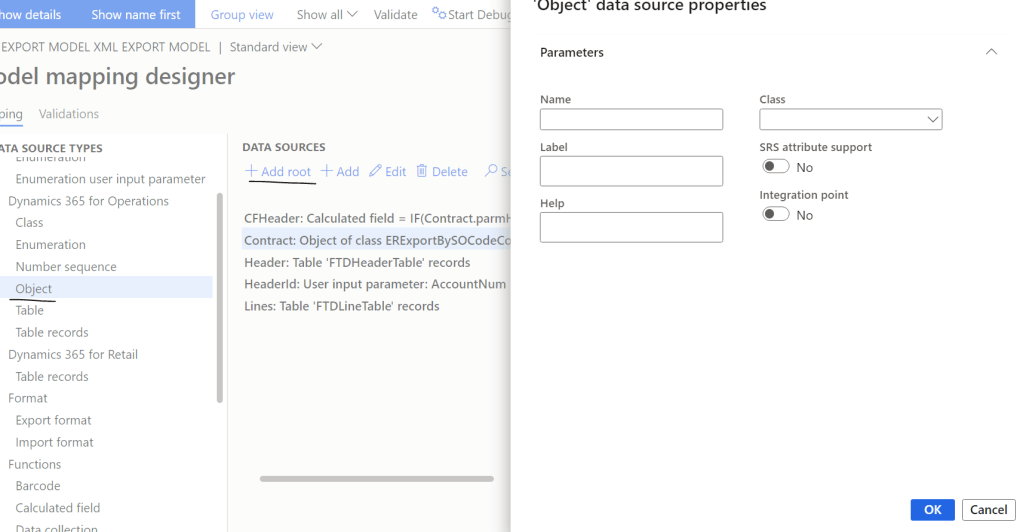
Once you have added the data contract, you want to normally use it to filter your DS, for example:
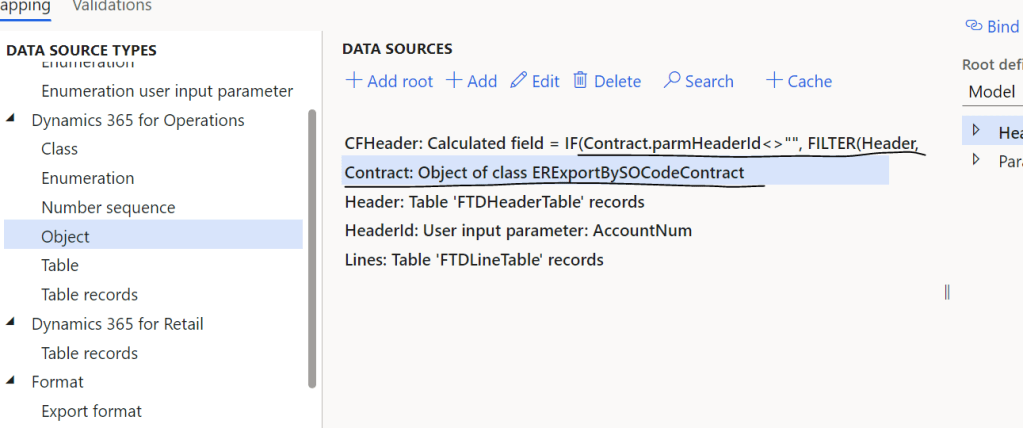
Having the following Data contract:
[DataContract]
public class ERExportBySOCodeContract extends ERFormatMappingRunBaseContract implements SysOperationValidatable
{
    ERFormatMappingId	formatMapping;
    str					modelDsName;
    str					ParametersDsName;
	AccountNum			headerId;
    Filename			fileName;


	public boolean validate()
    {
        boolean ret = true;

        if (!formatMapping)
        {
            ret = checkFailed(strFmt("@SYS26332", new SysDictType(extendedTypeNum(ERFormatMappingId)).label()));
        }

        if (!ERFormatMappingTable::find(formatMapping).RecId)
        {
            ret = checkFailed("@FTD:InvalidER");
        }

        if (!FTDHeaderTable::exist(headerId))
        {
            ret = checkFailed("@FTD:InvalidHeaderId");
        }

        return ret;
    }

    [
        DataMemberAttribute('FormatMapping'),
        SysOperationLabelAttribute(literalstr("@ElectronicReporting:FormatMapping")),
        SysOperationHelpTextAttribute(literalstr("@ElectronicReporting:FormatMapping"))
    ]
    public ERFormatMappingId parmFormatMapping(ERFormatMappingId _formatMapping = formatMapping)
    {
        formatMapping = _formatMapping;
        return formatMapping;
    }

	[DataMember]
    public AccountNum parmHeaderId(AccountNum _headerId = headerId)
    {
        headerId = _headerId;
        return headerId;
    }

    [DataMember]
    public str parmModelDsName(str _modelDsName = modelDsName)
    {
        modelDsName = _modelDsName;
        return modelDsName;
    }

    [DataMember]
    public str parmParametersDsName(str _ParametersDsName = ParametersDsName)
    {
        ParametersDsName = _ParametersDsName;
        return ParametersDsName;
    }

    [DataMember]
    public Filename parmFileName(fileName _filename = fileName)
    {
        fileName = _filename;
        return fileName;
    }

}
Let’s go to see how to call the ER formats that use that model through code:
using Microsoft.Dynamics365.LocalizationFramework;
internal final class ERExportBySOCodeService
{
    /// <summary>
    /// Generates report by using Electronic reporting framework
    /// </summary>
    /// <param name = "_contract">The ER contract</param>
    public void executeOperation(ERExportBySOCodeContract _contract)
    {
        ERFormatMappingId formatMappingId;
        formatMappingId = _contract.parmFormatMapping();


		ERIModelDefinitionParamsAction parameters = new ERModelDefinitionParamsUIActionComposite()
			.add(new ERModelDefinitionObjectParameterAction(_contract.parmModelDsName(), _contract.parmParametersDsName(), _contract, true));

		// Call ER to generate the report.
		ERIFormatMappingRun formatMappingRun = ERObjectsFactory::createFormatMappingRunByFormatMappingId(formatMappingId,
			_contract.parmFileName(),
			false,
			true,
			true);

		formatMappingRun.withParameter(parameters);
		formatMappingRun.withFileDestination(_contract.getFileDestination());

		formatMappingRun.run();

    }

}
being the modelDsName the same model node in the format mapping that we saw above and the parametersDSName would be the name of the contract object instance in our Model Mapping, in our case it was Contract:

We are executing it in this case using the SysOperationsFramework and reusing the same DC that we later send to the ER.
The UI result is:
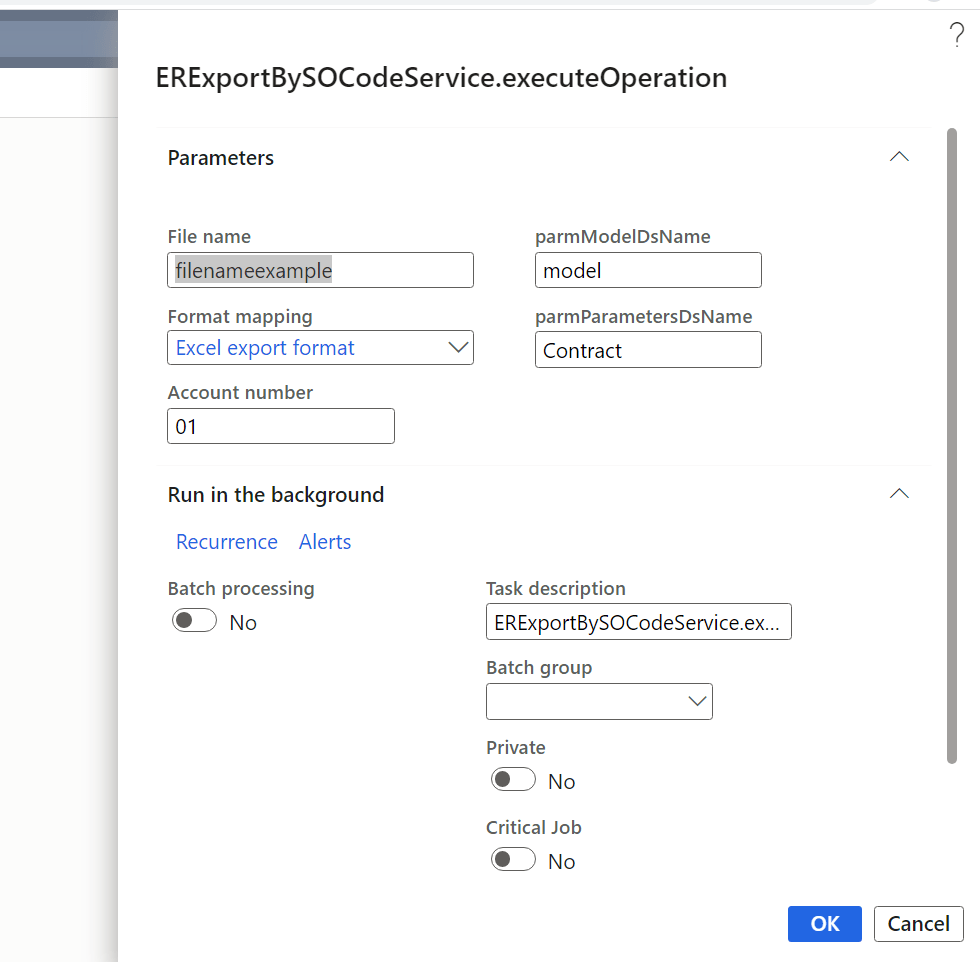

Where we have used the contract parameters of our Sys Operations to filter the data of the ER and to also decide which ER to use, specifying the model root and the path and name of our Data Contract object. In a recent post, I have shared for free my particular solution that I use for calling all the ER reports from code, check it out!
 Fernitudela.dev
Hi! Great article.
How do you filter your DS? (CFHeader). It is cut off and I’m very interested in knowing.
LikeLike
That was created here, there you have more details:
LikeLike
Hi Fernando. Thank you for all your contributions to the community. I appreciate it.
One question following your tutorials: how to force this execusion to follow a specific Destination Setting?
LikeLike
What I do in these occasions, is, using my solution:
https://github.com/FernitudelaDev/RunERReportsByCode
setting the use destinations to no (that will ignore the settings of the destinations),
and in the doHandleStream, do the actions I want.
LikeLike