
In previous video/post we saw how we could use the selected records in a form in a SysOperation process. In my suggested solution we put the record Ids in a valid Data Member collection and we used them after that. I used a Container because in the example I was thinking on selecting a few records for it, but I was thinking that this decision could drive you to a misunderstanding of me saying that you have to use a container in every situation. In this video/Post we are going to see why you shouldn’t use a container if a big number of records are expected to be treated. And as an alternative I put here how would it be using a List.
List Approach
Note the attributes in the Contract. They are added to hide the list into the dialog in one hand, and in the other hand to specify the data types that the list elements are going to be (this is mandatory as list elements are strongly typed).

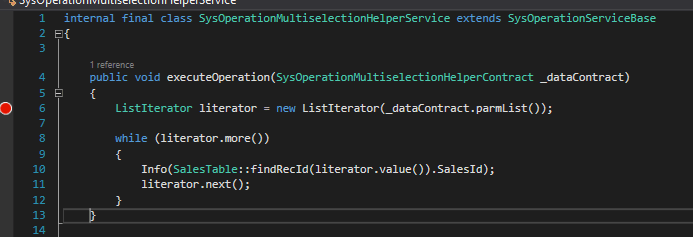
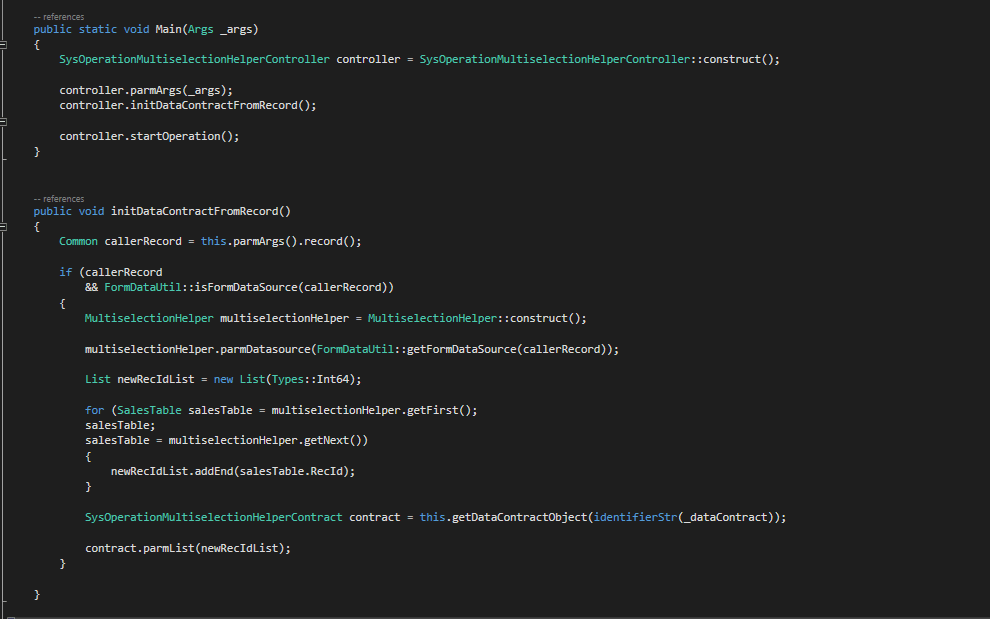
Thanks for understanding what I meant and sorry for the confusion!
 Fernitudela.dev
Hi,
The link is very useful. We have got the similar requirement. In this scenario, upon clicking the button control, a popup message for confirmation should be triggered. Once the user confirms, a batch job should be initiated to process the selected records. To achieve this, can you suggest how to pass arguments to the batch classes?
Thanks in advance,
Rabiarizwana
LikeLike
As I do in this example! using a List with the RecIds in the contract. It should be a contract data member in order to get to the batch execution, anything else will be cleared. To avoid it showing in the UI, use the same attribute I used in this post, and if it’s going to be a large amount of records I suggest you to use a list instead of a container.
many thanks for the comment
LikeLike