
Electronic Reporting, despite not being code based, is still development, and it deals with data whether it is used for reporting or for integration purposes, so performance is something to definitely take into acount. In this video we include the ER Perfomance into the table, bringing an example that will help us understand how data is loaded into the ER and to give the importance to the optimization that it really has. (See part 5 about Excel templates in detail for Business documents)
WHERE vs FILTER in ER.
The example that we are going to see is based on our ER to export data from our FTDHeader and line tables created in the second half of the previous post. There, we exported an Excel using a model that we reused from the post D365FO Electronic Reporting (GER) from scratch part 2: Export an XML, check them out if you didn’t before. In the model mapping (mapping from the tables to the model) we used Calculated Fields to filter using the WHERE function in order to only retrieve the data filtered by our parameter.
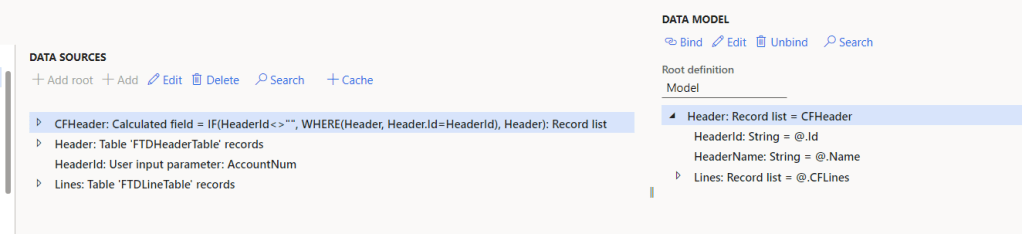
In this video and post, what I’ve done is to insert in bulk many records to the table in order to force the ER and test its performance, and using the Start Debugging option in the ER designer we can see how it takes a lot to load the calculated field, and that happens because the WHERE function applies its filter after the data is loaded in memory from the tables, and so it goes through the list in memory and does the filtering, but there is an alternative, to wear the filtering directly to SQL: use the function FILTER. (to use the ask for query in the record list object directly is also a good alternative, as it also filters the SQL query):
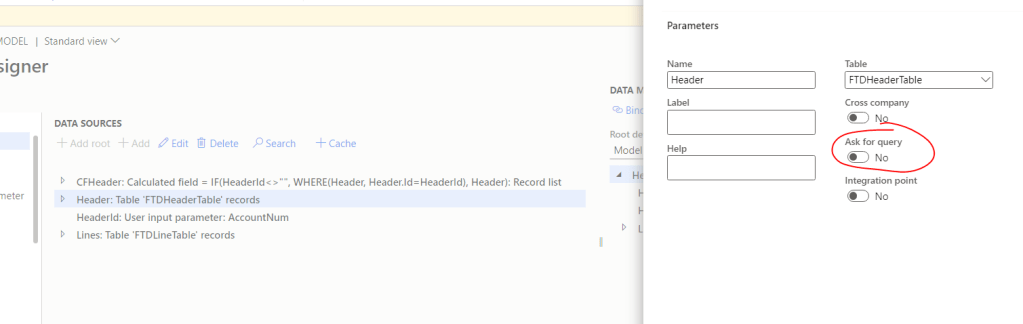
Error with FILTER function “The list expression of FILTER function is not queryable.”
So I replace the WHERE function for the FILTER function and…

Error, The list expression of FILTER function is not queryable. That happens because inside the Record list that we are filtering there is an object, in this case a calculated field created by me in the past, but it could be other things, like a ER specific join for example, which are not convertible to SQL; usually the ER objects which logic will be executed in memory at report runtime are the ones that will cause that error. This is consequence of the fact that the FILTER function is compiled into direct SQL querying, and this is also the reason why it is so powerful in terms of performance.

The solution in this case is very simple, we remove the CFLines calculated field of the Header table records, we change the WHERE per FILTER function, and then, in the new CFHeader created object we now can create a new CFLINE and, why not, use the FILTER method to get only children related records (we’ll need to rebind again the lines only if we put a different name to the new CF):
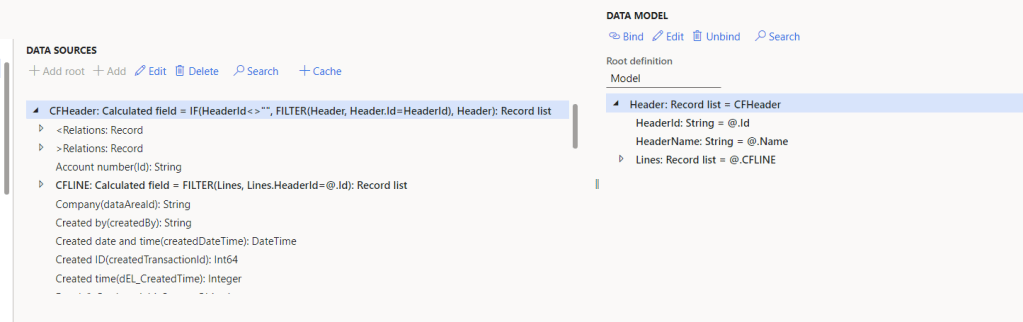
After doing this change, and with the Debugging option, we can see how now the loading of the CFHeader is instantaneous.
Conclusion
In conclusion, performance can be crucial in our GERs, and we need to find the balance between simplicity and optimization. We need to be aware of the amount of data and the way the data is related and how it is going to be loaded. Using FILTER instead of WHERE can be useful in some situations, in others we might need to do a JOIN or exploit other ER tool to achieve the optimization required, but the first step is awareness, it is always better to detect it in development phase and be sad while you fix it one day, rather than be happy in that phase and having the customer complaining later to make you angry during a month.
 Fernitudela.dev