
In the post Get dimension descriptions, we used the DictTable and the common.(fieldId) functionality in our method. As I have received some questions related to that, I have decided to do this short post focusing on it with an easy and more didactic example.
Create a generic select using TableId and FieldId
The example will consist on this method, where we receive the table and field Ids to determine what table to query and what field to filter by; and the value. Note that the value is of Anytype, this means that it can accept any data type, so it is very useful when you are doing generic code but also it is a little dangerous because a bad use of it might bring errors at runtime instead of at build time. In this example and because it is supposed to be didactic and simple, we are not handling the case of receiving a value type that is different from the field type in the table, but I definitely would do it if I had to develop something like that in the real world.
    public static Common findFromTableAndFieldId(TableId _tableId, FieldId _fieldId, Anytype _valueId)
    {
        DictTable   dictTable       = new DictTable(_tableId);
        Common      instanceTable   = dictTable.makeRecord();

        select firstonly instanceTable
            where instanceTable.(_fieldId) == _valueId;

        return instanceTable;
    }
We can see that the class DictTable receive the tableId in the constructor and using the makeRecord() method will create an instance of the specific table that we want even though it is saved in a common variable, because they are compatible as every table inherits from Common. This behaviour is better seen in the test (below) I have done to test the functionality (and also to show you how this method is expected to be used). Note also that we are using the fieldId to access the field in our instance without having it in the Common table, using the .(fieldId), this is also very useful in terms of writing generic code.
Testing and how to use this method.
In order to test the method, first we need to create a record in the CustTable. It only fulfils the relevant information for our test, that’s why It only populates the AccountNum and does a doInsert(). Using this method to insert is a very bad practice out of the testing world, but here it is the easiest and fastest way to do it (and in tests we don’t care about data integrity because this is all dummy data that will exists only in memory), and allow us to test our code, so it is perfect. If you are not familiar with tests in x++, the only thing you need to know to understand this is the assertEquals, basically it compares the first and second argument and check that they are equal, if not the test will fail.
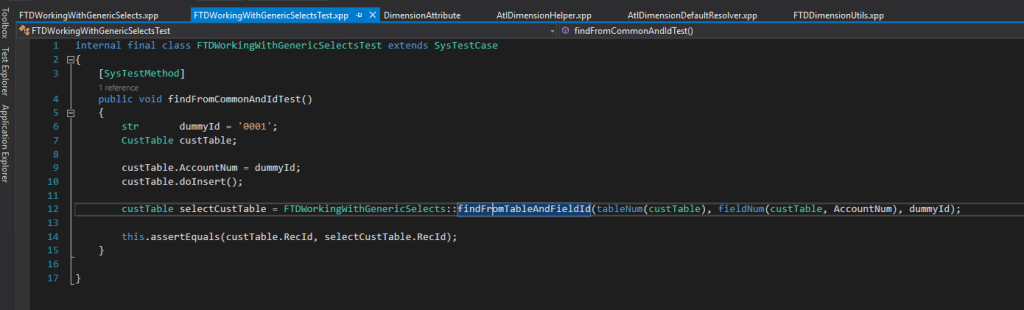
Of course this test passed so we can conclude that the method works as we expect it to do!

Thanks for your time and hope it is useful to you, see you next time!
 Fernitudela.dev